# Accounts Payable Information System (APIS)

An ***Mgm Food &amp; Commodities Corporation*** and ***Mgm Blendwell Corporation*** organization may manage accounts payable more efficiently and automatically by using an accounts payable information system (APIS), which is a software program or set of tools.

<p class="callout warning"><span style="color: rgb(224, 62, 45);">**Here's a general guide:**</span></p>

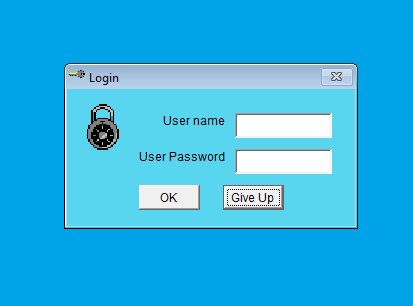
<p class="callout info">First of all, login into your account at **APIS**.</p>

[![image.png](https://kb.mgmfoods.com.ph/uploads/images/gallery/2024-06/scaled-1680-/knpimage.png)](https://kb.mgmfoods.com.ph/uploads/images/gallery/2024-06/knpimage.png)

---

<p class="callout info">We employ *[MGM Blendwell APIS](https://kb.mgmfoods.com.ph/link/18#bkmrk-mgm-blendwell-%C2%A0)* and *[MGM Foods APIS](https://kb.mgmfoods.com.ph/link/18#bkmrk-mgm-foods)*, two distinct program types under APIS, in our organization.</p>

<details id="bkmrk-mgm-blendwell-%C2%A0"><summary>MGM Blendwell</summary>

[![image.png](https://kb.mgmfoods.com.ph/uploads/images/gallery/2024-06/scaled-1680-/w09image.png)](https://kb.mgmfoods.com.ph/uploads/images/gallery/2024-06/w09image.png)

</details><details id="bkmrk-mgm-foods"><summary>MGM Foods</summary>

[![excel.png](https://kb.mgmfoods.com.ph/uploads/images/gallery/2024-06/scaled-1680-/Upfexcel.png)](https://kb.mgmfoods.com.ph/uploads/images/gallery/2024-06/Upfexcel.png)

</details>---

<p class="callout info">Usually, you can print documents from the menu in the upper left corner, but [*Transaction*](https://kb.mgmfoods.com.ph/link/18#bkmrk-transaction-the-tran) and [*Reports* ](https://kb.mgmfoods.com.ph/link/18#bkmrk-reports-the-reports-)are the most typical uses for it.</p>

<details id="bkmrk-transaction-the-tran"><summary>Transaction</summary>

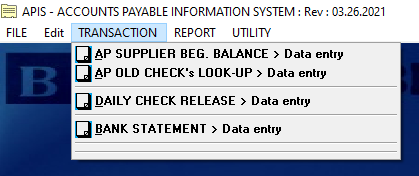
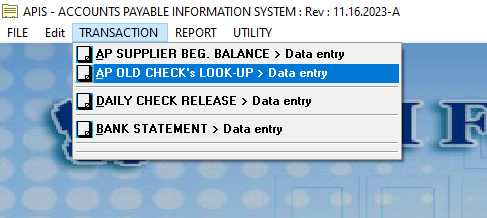
The transaction menu offers a variety of options for printing documents.

<p class="callout info"><span style="color: rgb(224, 62, 45);">***Blendwell Transaction Interface***</span></p>

![image.png](https://kb.mgmfoods.com.ph/uploads/images/gallery/2024-06/scaled-1680-/YtIimage.png)

<p class="callout info"><span style="color: rgb(224, 62, 45);">***Foods Transaction Interface***</span></p>

[![image.png](https://kb.mgmfoods.com.ph/uploads/images/gallery/2024-06/scaled-1680-/7nximage.png)](https://kb.mgmfoods.com.ph/uploads/images/gallery/2024-06/7nximage.png)

</details><details id="bkmrk-reports-the-reports-"><summary>Reports</summary>

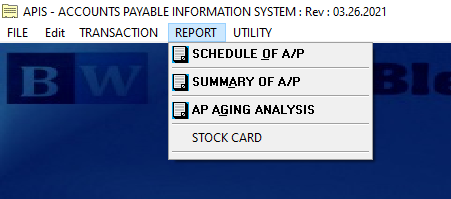
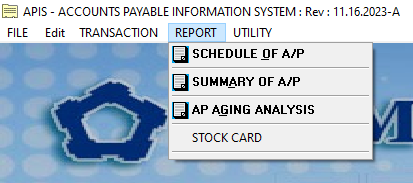
The Reports menu offers a variety of options for printing documents.

<p class="callout info"><span style="color: rgb(224, 62, 45);">***Blendwell Report Interface***</span></p>

[![image.png](https://kb.mgmfoods.com.ph/uploads/images/gallery/2024-06/scaled-1680-/W6Oimage.png)](https://kb.mgmfoods.com.ph/uploads/images/gallery/2024-06/W6Oimage.png)

<p class="callout info"><span style="color: rgb(224, 62, 45);">***Food Report Interface***</span></p>

[![image.png](https://kb.mgmfoods.com.ph/uploads/images/gallery/2024-06/scaled-1680-/dDuimage.png)](https://kb.mgmfoods.com.ph/uploads/images/gallery/2024-06/dDuimage.png)

</details>---

<p class="callout info">There are four distinct options under the <span style="color: rgb(224, 62, 45);">***Transaction*** </span>menu for printing documents or files.</p>

<details id="bkmrk-ap-supplier-beg.-bal"><summary>AP SUPPLIER BEG. BALANCE &gt; Data entry</summary>

<details data-id="details-1718688775529"><summary>Blendwell - AP Beginning Balance Setup UI or Interface</summary>

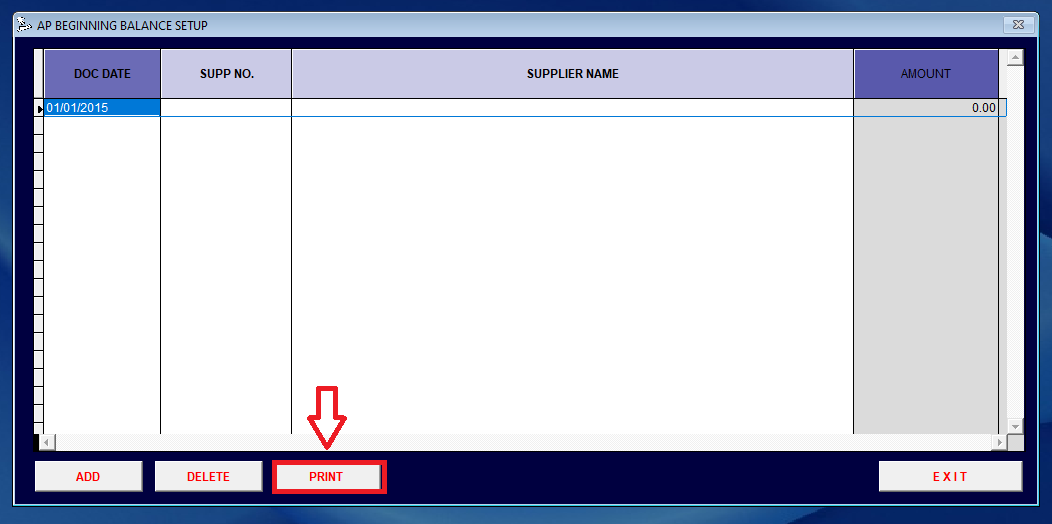
<p class="callout info"><span style="color: rgb(0, 0, 0);">When you click the AP Beginning Balance configuration option in the Transaction menu, <span style="color: rgb(224, 62, 45);">follow these steps:</span></span></p>

<span style="color: rgb(0, 0, 0);">**Step 1:** The UI for the AP Beginning Balance Setup likewise displays ***"PRINT"*** and Click it.</span>

[![excel.png](https://kb.mgmfoods.com.ph/uploads/images/gallery/2024-06/scaled-1680-/Djbexcel.png)](https://kb.mgmfoods.com.ph/uploads/images/gallery/2024-06/Djbexcel.png)

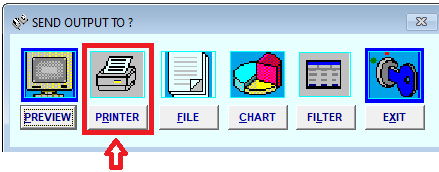
**Step 2:** After clicking the ***"PRINT"*** button, another option appears. Click it.

[![excel.png](https://kb.mgmfoods.com.ph/uploads/images/gallery/2024-06/scaled-1680-/DO6excel.png)](https://kb.mgmfoods.com.ph/uploads/images/gallery/2024-06/DO6excel.png)
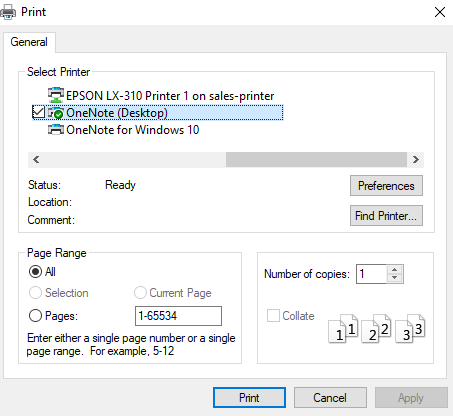
**Step 3:** Select your printer's name and click "<span style="color: rgb(224, 62, 45);">Print</span>".

[![image.png](https://kb.mgmfoods.com.ph/uploads/images/gallery/2024-06/scaled-1680-/qWWimage.png)](https://kb.mgmfoods.com.ph/uploads/images/gallery/2024-06/qWWimage.png)

</details><details><summary>Foods - AP Beginning Balance Setup UI or Interface</summary>

</details></details><details id="bkmrk-ap-old-check%27s-look-"><summary>AP OLD CHECK's LOOK-UP &gt; Data entry</summary>

<details><summary>Blendwell - AP Look-Up Table Only UI or Interface</summary>

<details data-id="details-1718768755267"><summary></summary>

</details></details><details><summary>Foods - AP Look-Up Table Only UI or Interface</summary>

</details></details><details id="bkmrk-daily-check-release-"><summary>DAILY CHECK RELEASE &gt; Data entry</summary>

</details><details id="bkmrk-bank-statement-%3E-dat"><summary>BANK STATEMENT &gt; Data entry</summary>

</details>---